09ModulesConstruction & Industrial Safety Management
Safety documented – right on site.
Inspections, hazards, briefings and incidents. Capture on a phone, even offline, and follow actions through to verification.

09 — AIDA Construction Suite
02
What
It Does
What SiteSafe does in the application – ordered by area.
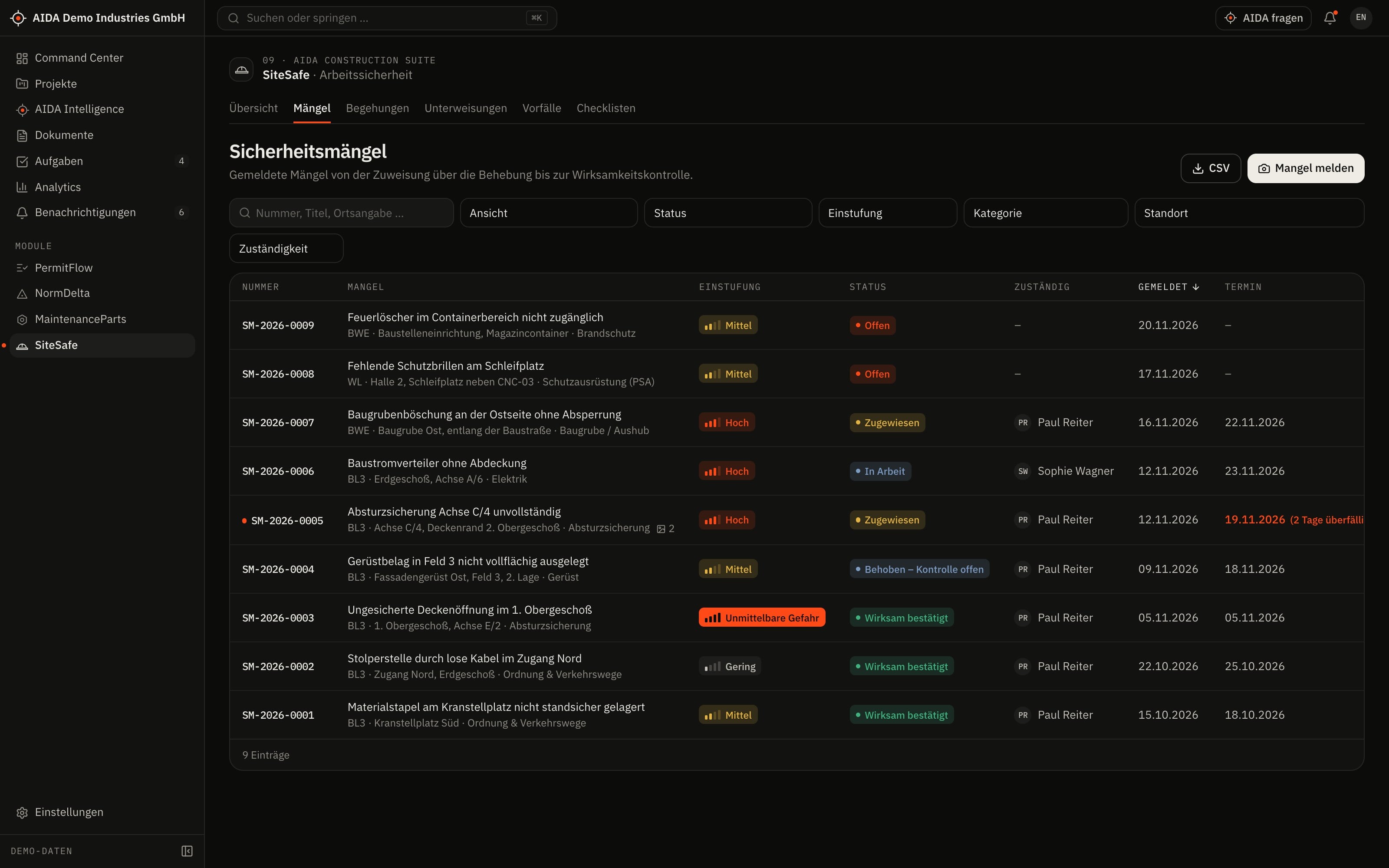
Observations
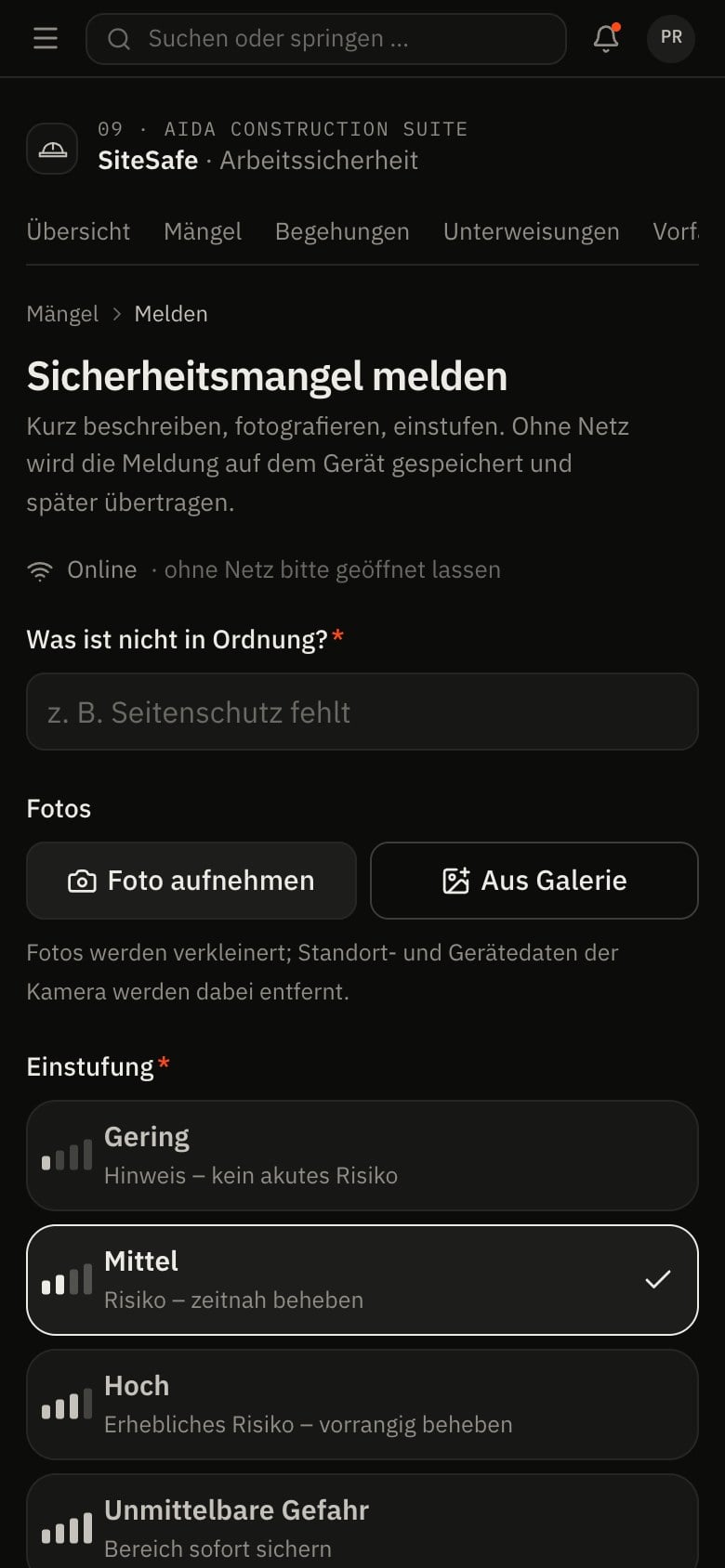
- Capture on a phone, with up to six photos and a rating from “low” to “immediate danger”
- Assign with a due date – also to external partners who see only their projects
- Report the fix; effectiveness is confirmed by a different person
Inspections
- Plan inspections, including recurring ones, and carry them out with a checklist
- Create an observation directly from a checklist item
- Complete and sign off – with a calculated completion score and a follow-up inspection
Trainings
- Participants from the organisation and external people
- Confirm participation; validity with an expiry date
Incidents and checklists
- Report, investigate and close incidents – no health data is recorded
- Create and activate your own checklists
03
How AIDA
Helps
Two kinds of support that AIDA never mixes: fixed rules over your data – and an assistant that only writes after approval.
Rule-based · no language model
AIDA insights
Insights come from fixed calculation rules over stored data. Each names its evidence and links to the record.
- An observation is overdue when its due date has passed and it has not been reported as resolved.
- Trainings: notice 30 days before validity expires.
- An incident can only be closed once investigation and cause are documented.
- Trend of observations per week and distribution by rating.
Assistant · only after approval
AIDA Intelligence
- From observations, inspections and incidents you open AIDA Intelligence with the respective record as context.
- Answers cite their sources.
- Write actions are only carried out after you confirm.
- No AI service is configured by default. Without a service that is configured and approved by your organisation, the assistant works in research mode: sourced findings, no written text.
04
The
Workflow
From observation to confirmed fix
Capture the observation
On site on a phone: photo, location, rating. Without a connection the capture stays on the device.
Synchronise
As soon as the device is connected again, the captures are transferred.
Assign
The observation goes to the person or company responsible, with a due date.
Fix and report
The person responsible reports the fix.
Confirm effectiveness
A different person with approval rights confirms that the measure works – the four-eyes principle.
Reports and exports
- Inspection report as PDF
- Training record as PDF
- Observation and incident lists as CSV
Exports stay within the access limits of the person exporting; every export is in the audit log.
05
Clear
Limits
What SiteSafe does not do – so you know what you can rely on.
- Offline capture with later synchronisation
- Observations captured offline are stored only on the device until transferred. Only after synchronisation are they visible to others and backed up. Photos are reduced in size on the device before they are transferred.
- Documentation, not assessment
- SiteSafe records inspections, observations and actions. The safety assessment stays with your specialists.
06
Links
& Roles
Which modules SiteSafe shares data with – and which roles read, write, approve or delete in it.
Works together with
- PermitFlow
- shared project
- NormDelta
- site assignment
- AIDA Core
- projects, sites, documents, tasks and approvals
Roles and permissions
| Role template | Read | Write | Approve | Delete |
|---|---|---|---|---|
| Organization Owner | yes | yes | yes | yes |
| Organization Admin | yes | yes | yes | yes |
| Project Manager | yes | yes | yes | no |
| Engineer | yes | yes | no | no |
| Quality Manager | yes | no | no | no |
| Safety Manager | yes | yes | yes | yes |
| Maintenance Manager | yes | no | no | no |
| External Contractor | yes | yes | no | no |
| Read-Only Auditor | yes | no | no | no |
Templates as created when an organisation is set up. Every organisation can adapt them and create its own roles; checks happen on the server.
See AIDAat Work
With your access we set up SiteSafe for you – together with the modules that go with it.