04ModulesQuality & Non-Conformance Management
From defect to effective action.
Record non-conformances, analyse root causes, track CAPA actions and spot repeat defects – with documented sign-off.

04 — AIDA Industrial Suite
02
What
It Does
What QualityNCR does in the application – ordered by area.
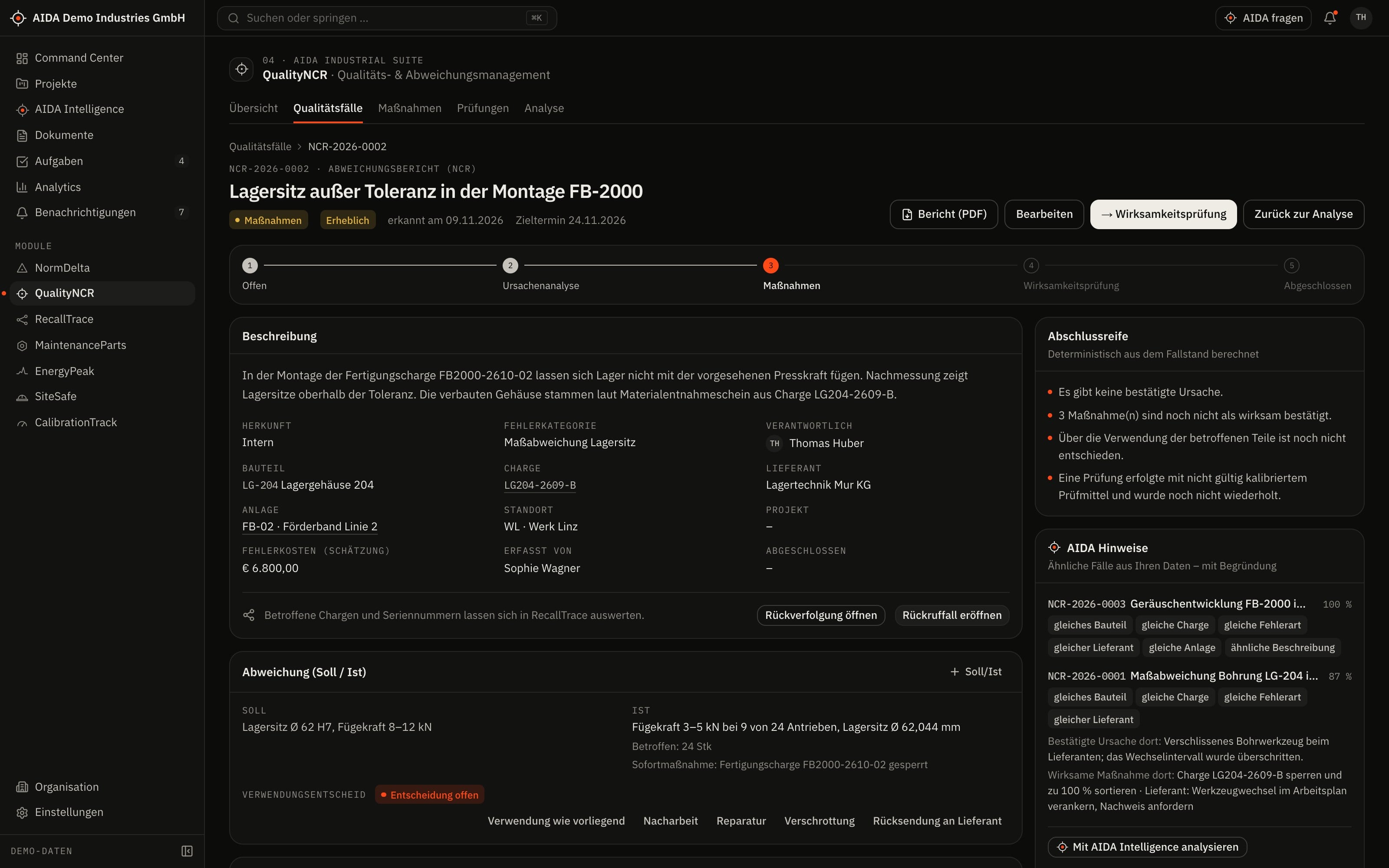
Quality cases
- Case linked to component, batch, supplier, equipment, project and site
- Non-conformances with target and actual values and the decision on the use of the affected parts
- Status from “open” via analysis, action and effectiveness check to “closed”
Root causes and actions
- Record and confirm root causes
- Corrective and preventive actions with an owner and a due date
- Every action ends with the assessment “effective” or “not effective” – under the four-eyes principle
Inspections
- Inspections with result and the instrument used
- The instrument's calibration status at the time of inspection is shown on the inspection
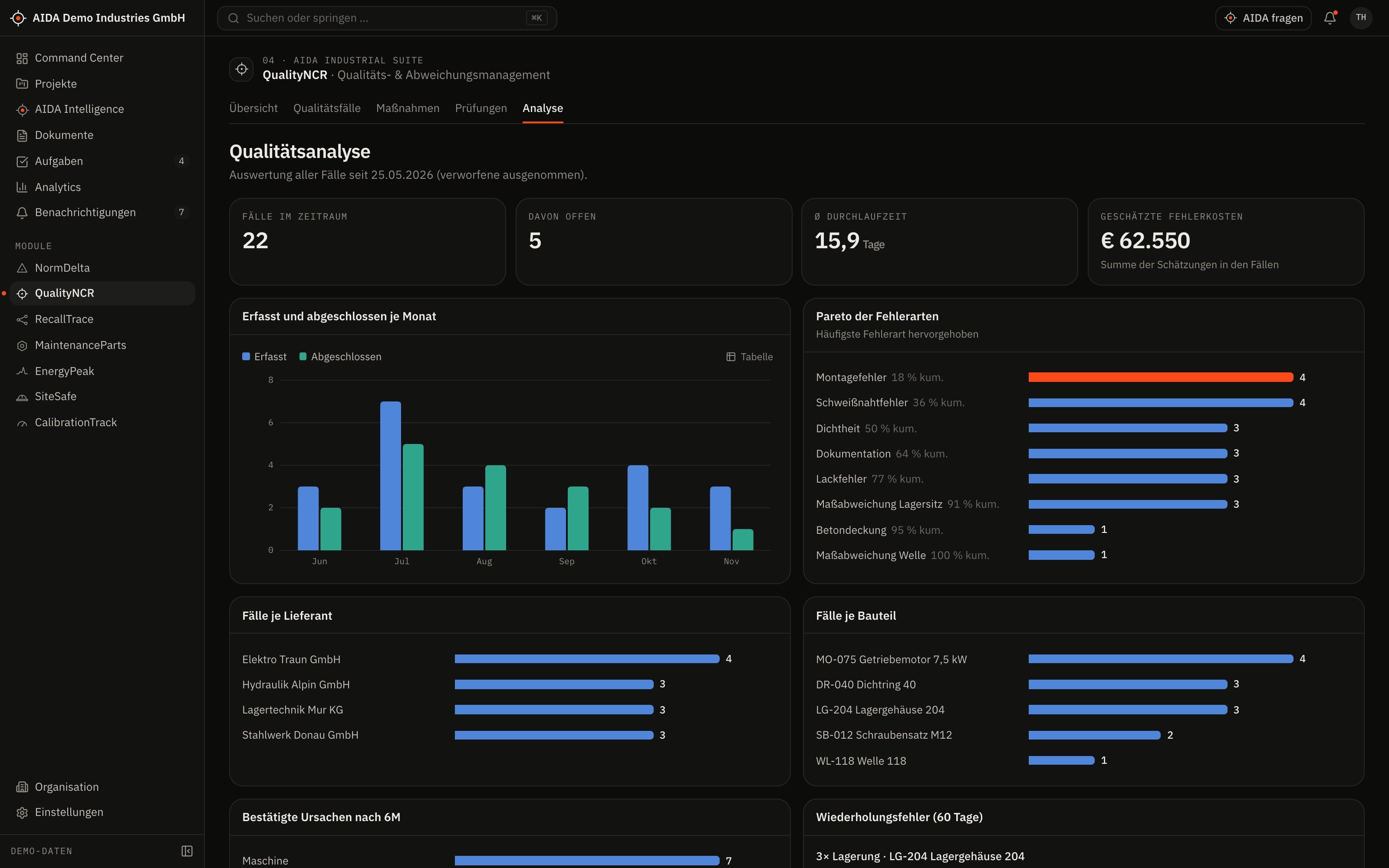
Analysis
- Pareto analysis of cases and mean lead time
- Actions and inspections across all cases in dedicated lists
03
How AIDA
Helps
Two kinds of support that AIDA never mixes: fixed rules over your data – and an assistant that only writes after approval.
Rule-based · no language model
AIDA insights
Insights come from fixed calculation rules over stored data. Each names its evidence and links to the record.
- Similar cases: for every case AIDA ranks earlier cases by shared attributes and matching wording – with the reason for the match.
- Clusters: several cases for the same component, supplier or defect category are reported as a cluster.
- Closure check: a case can only be closed once a root cause is confirmed, actions are defined and none is rated ineffective, the disposition is decided and no inspection with an invalidly calibrated instrument is outstanding.
Assistant · only after approval
AIDA Intelligence
- From a quality case you open AIDA Intelligence with that record as context – for a summary with possible causes and actions, each with sources.
- Answers cite their sources.
- Write actions are only carried out after you confirm.
- No AI service is configured by default. Without a service that is configured and approved by your organisation, the assistant works in research mode: sourced findings, no written text.
04
The
Workflow
From defect to effective action
Record the case
What was noticed and where – with component, batch, supplier or equipment.
Assess the non-conformance
A decision is made on the affected parts: for example rework or blocking.
Confirm the root cause
Root causes are recorded; only a confirmed cause carries the case forward.
Carry out the actions
Corrective and preventive actions run with due dates with the people responsible.
Check effectiveness
Every action is assessed. An ineffective action leads back to the action phase.
Approve closure
Closure is decided by a person with the “approve” right.
Reports and exports
- Case report as PDF
- Case list as CSV
Exports stay within the access limits of the person exporting; every export is in the audit log.
05
Clear
Limits
What QualityNCR does not do – so you know what you can rely on.
- Sign-off stays with people
- AIDA shows what is missing for closure. The decision is made by a person with the right to do so – and it is logged.
- Correlations, not causes
- Similarity and clustering are calculation rules over your cases. Your specialists determine the root cause.
06
Links
& Roles
Which modules QualityNCR shares data with – and which roles read, write, approve or delete in it.
Works together with
- RecallTrace
- component & batch
- CalibrationTrack
- instrument & calibration status
- MaintenanceParts
- affected equipment
- NormDelta
- process requirements
- AIDA Core
- projects, sites, documents, tasks and approvals
Roles and permissions
| Role template | Read | Write | Approve | Delete |
|---|---|---|---|---|
| Organization Owner | yes | yes | yes | yes |
| Organization Admin | yes | yes | yes | yes |
| Project Manager | yes | yes | no | no |
| Engineer | yes | yes | no | no |
| Quality Manager | yes | yes | yes | yes |
| Maintenance Manager | yes | yes | no | no |
| Read-Only Auditor | yes | no | no | no |
Templates as created when an organisation is set up. Every organisation can adapt them and create its own roles; checks happen on the server.
See AIDAat Work
With your access we set up QualityNCR for you – together with the modules that go with it.