02ModulesConstruction & Industrial Permit Management
From the first form to the decision – complete.
Permit procedures with requirements, documents, deadlines and owners. Completeness becomes visible before the authority asks.
02 — AIDA Construction Suite
02
What
It Does
What PermitFlow does in the application – ordered by area.
Cases
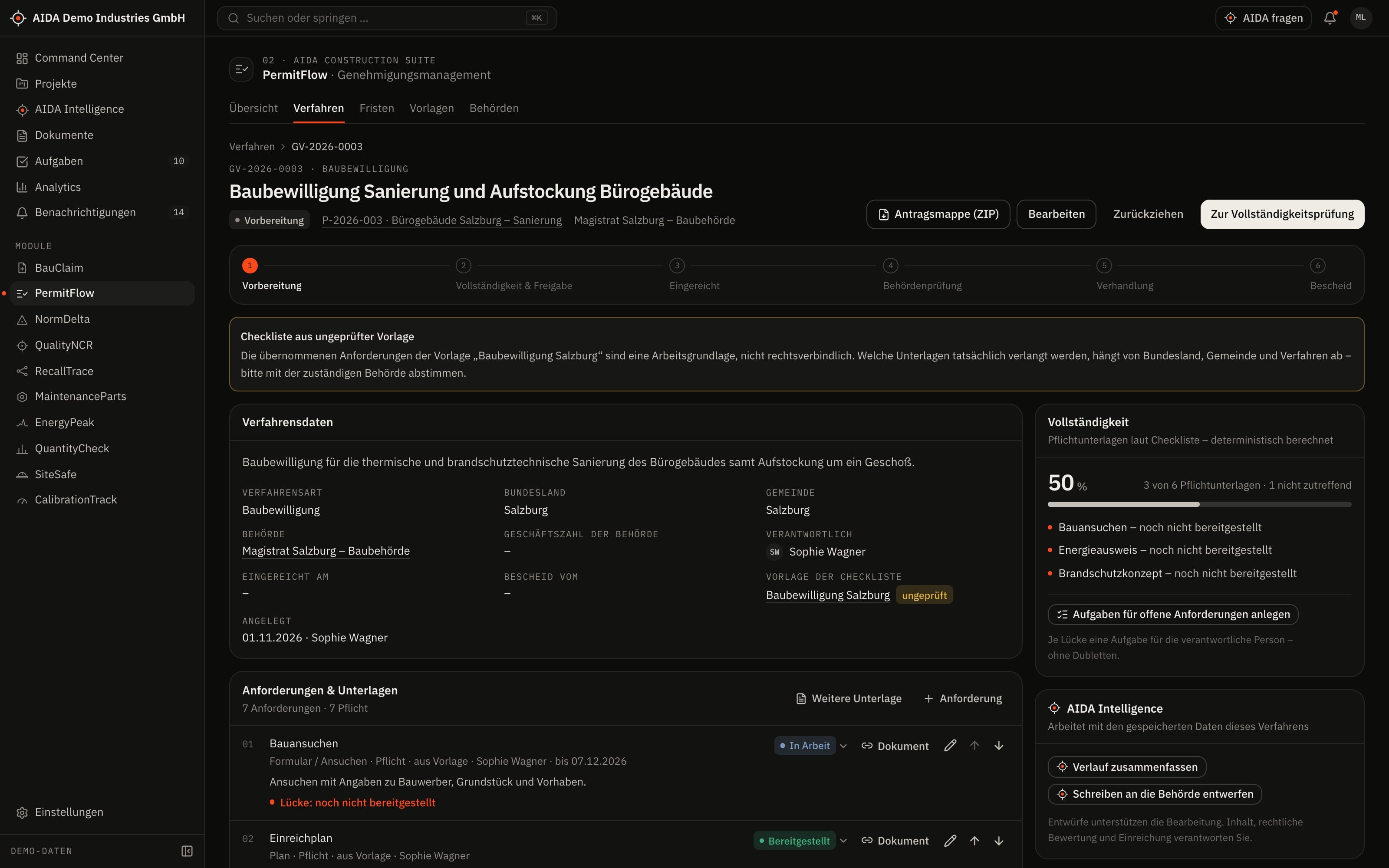
- Create a case from a template – with authority, project and requirements checklist
- Status from preparation via completeness check, submission and authority review to the decision
- Requests for additional information and hearings as separate steps
Requirements and documents
- Requirements by category, with status and owner
- Link documents from the store to requirements
- On submission, the submitted document versions are recorded
Deadlines and conditions
- Deadlines per case, with a dedicated overview across all cases
- Record conditions from the decision and track them until fulfilled
Templates and authorities
- Create and duplicate templates and mark them as verified
- Unverified templates are marked as such
- Register of authorities with their cases
03
How AIDA
Helps
Two kinds of support that AIDA never mixes: fixed rules over your data – and an assistant that only writes after approval.
Rule-based · no language model
AIDA insights
Insights come from fixed calculation rules over stored data. Each names its evidence and links to the record.
- Completeness check: shows every gap individually – missing mandatory documents, rejected documents and requirements marked as provided that have no document.
- From the gaps you create tasks for the people responsible.
- A case can only be submitted from the completeness check, with at least one document and internal approval in place.
- Overdue and upcoming deadlines are highlighted and appear in the Command Center.
Assistant · only after approval
AIDA Intelligence
- From a case you open AIDA Intelligence with that record as context – for example for a summary of where it stands.
- Answers cite their sources.
- Write actions are only carried out after you confirm.
- No AI service is configured by default. Without a service that is configured and approved by your organisation, the assistant works in research mode: sourced findings, no written text.
04
The
Workflow
From application to decision
Create the case from a template
The template brings the requirements checklist; you add or remove requirements.
Assign documents
For each requirement you link the document from the store and set the status.
Check completeness
AIDA lists the gaps; each can become a task if you wish.
Approve internally
Before submission, a person with the “approve” right decides.
Submit
AIDA records the submitted state and provides the application pack as a ZIP.
Decision and conditions
Requests for information, hearing and decision are recorded; conditions continue with their deadlines.
Reports and exports
- Application pack as a ZIP with the linked documents
Exports stay within the access limits of the person exporting; every export is in the audit log.
05
Clear
Limits
What PermitFlow does not do – so you know what you can rely on.
- Requirements from maintained templates
- Which documents a procedure requires is defined in your templates – not in a legal database. Unverified templates are marked; whether a template is complete for your procedure is for you to check.
- No electronic submission to authorities
- PermitFlow provides the application pack. Submission follows the route the authority prescribes.
06
Links
& Roles
Which modules PermitFlow shares data with – and which roles read, write, approve or delete in it.
Works together with
- BauClaim
- shared project
- QuantityCheck
- shared project
- SiteSafe
- shared project
- NormDelta
- project assignment
- AIDA Core
- projects, sites, documents, tasks and approvals
Roles and permissions
| Role template | Read | Write | Approve | Delete |
|---|---|---|---|---|
| Organization Owner | yes | yes | yes | yes |
| Organization Admin | yes | yes | yes | yes |
| Project Manager | yes | yes | yes | no |
| Engineer | yes | yes | no | no |
| Safety Manager | yes | no | no | no |
| Read-Only Auditor | yes | no | no | no |
Templates as created when an organisation is set up. Every organisation can adapt them and create its own roles; checks happen on the server.
See AIDAat Work
With your access we set up PermitFlow for you – together with the modules that go with it.