07ModulesIndustrial Energy Intelligence
See load peaks before they get expensive.
Load profiles, peaks, area consumption and cost per site. Import, compare, monitor thresholds, run scenarios.

07 — AIDA Industrial Suite
02
What
It Does
What EnergyPeak does in the application – ordered by area.
Sites and meters
- Per site: agreed power, threshold for load peaks and tariff
- Meters per area, linked to the related equipment if required
Import
- Measurements as CSV: preview with validation of every row, then import
- Timestamps, unit and decimal format are validated; gaps in the series are detected
Analysis
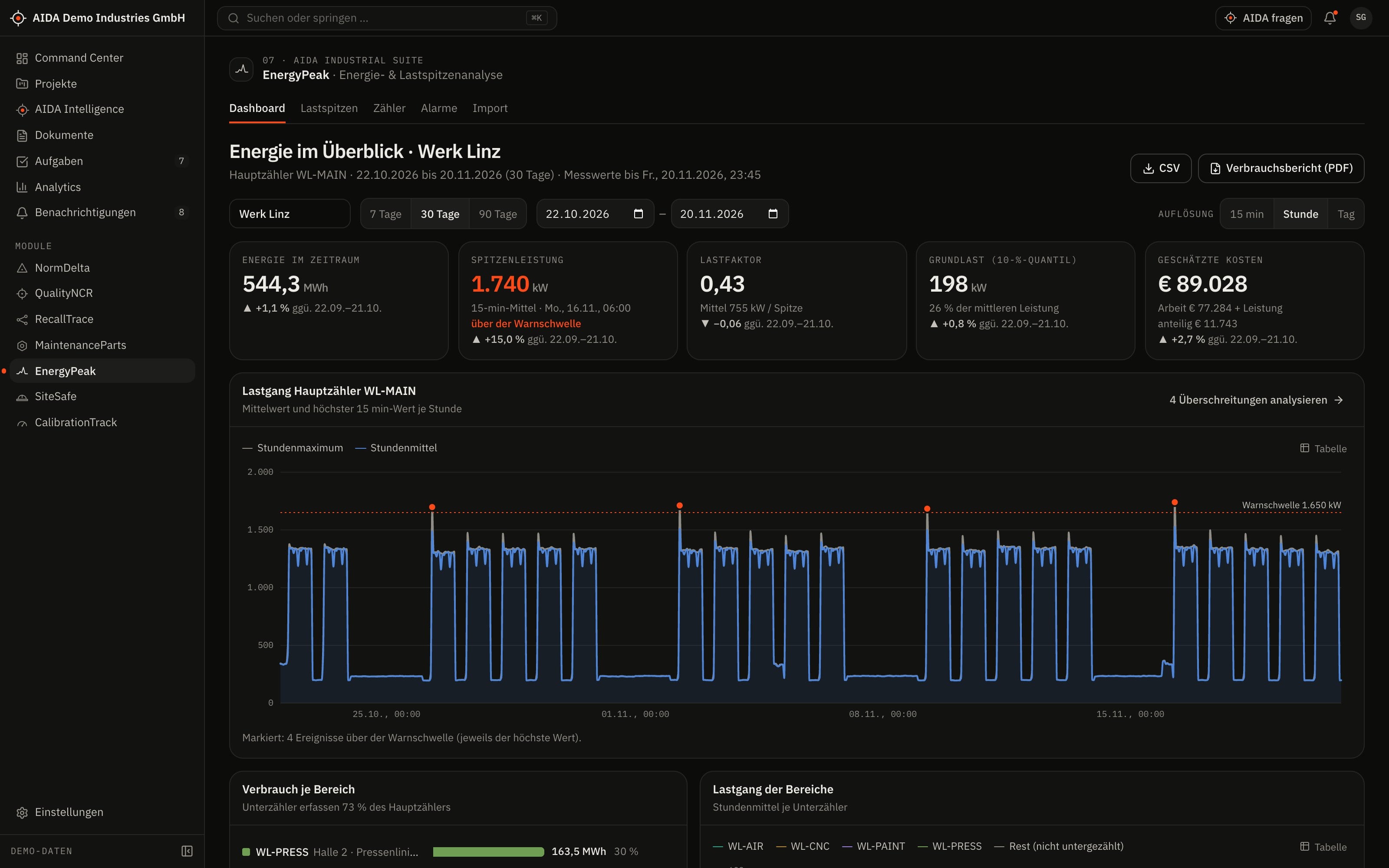
- Dashboard per site: load profile with threshold and peaks, area shares, heat map
- Comparison with the previous period and duration curve
- Cost estimate from the stored tariff
Alerts and scenarios
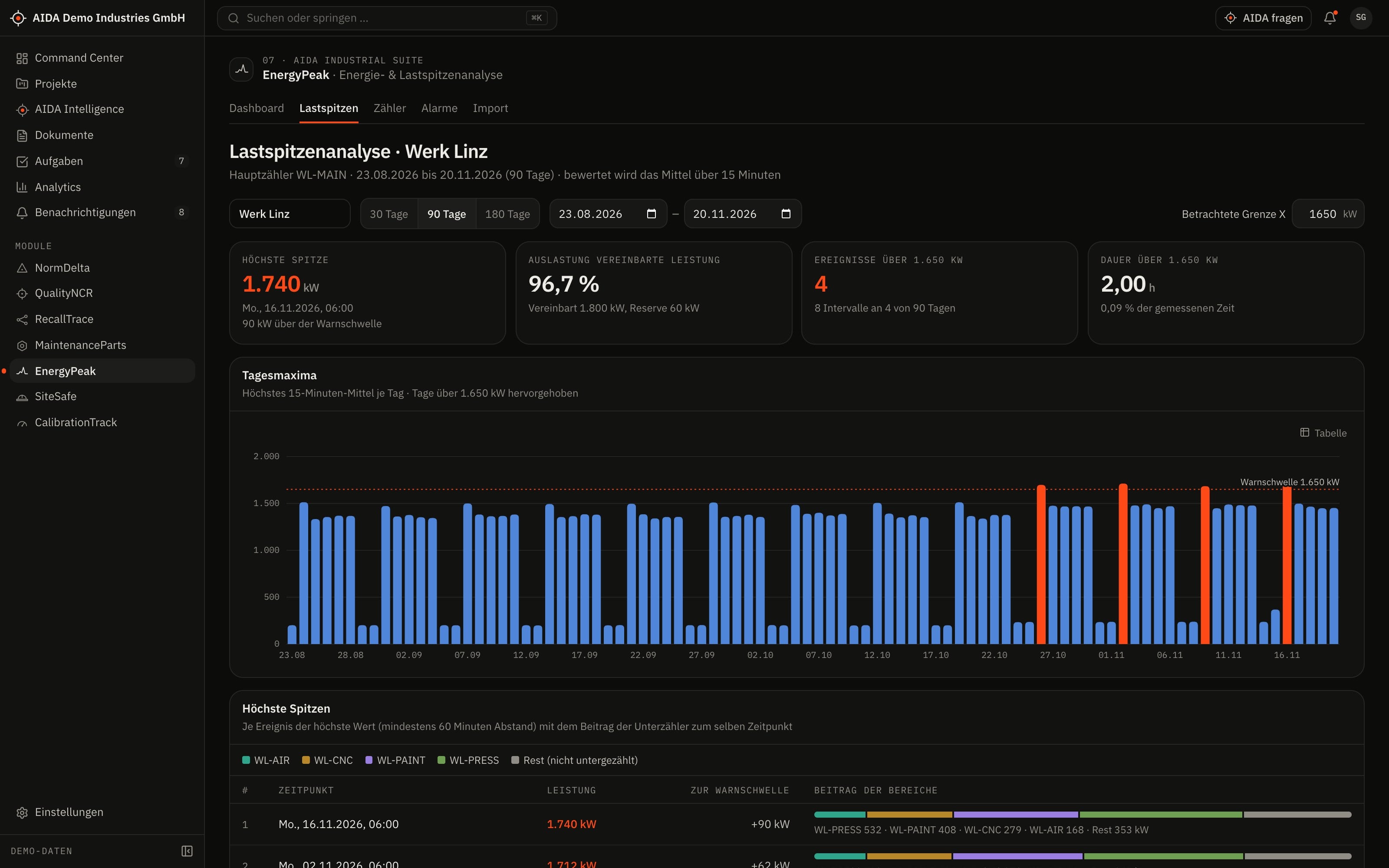
- Three kinds of alerts: threshold exceeded, anomaly against the reference profile, data gap
- Acknowledge alerts, resolve them or pass them on as a task
- Scenarios for peak capping and load shifting – with the calculation shown
03
How AIDA
Helps
Two kinds of support that AIDA never mixes: fixed rules over your data – and an assistant that only writes after approval.
Rule-based · no language model
AIDA insights
Insights come from fixed calculation rules over stored data. Each names its evidence and links to the record.
- Reference profile: mean and spread per weekday and hour, computed from your measurements.
- Anomaly: the load is more than three standard deviations above the reference value for at least four consecutive intervals.
- Data gap: reported from two consecutive missing intervals; single dropouts count as transmission errors.
- An expected value is only shown when at least four weeks of measurements and a sound reference profile are available.
Assistant · only after approval
AIDA Intelligence
- From the dashboard you open AIDA Intelligence with the site as context.
- Answers cite their sources.
- Write actions are only carried out after you confirm.
- No AI service is configured by default. Without a service that is configured and approved by your organisation, the assistant works in research mode: sourced findings, no written text.
04
The
Workflow
From import to assessed alert
Set up site and meters
Store agreed power, threshold and tariff; create the meters.
Import measurements
The preview shows every faulty row before anything is imported.
Compute the reference profile
The profile per weekday and hour is built from the available measurements.
Run the evaluation
AIDA checks threshold, reference profile and gaps and creates alerts – without duplicates when run again.
Assess the alert
Acknowledge, resolve or pass it on as a task to the person responsible.
Run a scenario
What does a capped peak or a shifted load achieve? The calculation is shown alongside.
Reports and exports
- Consumption report as PDF
- Aggregated measurements as CSV
- Sample file for the import
Exports stay within the access limits of the person exporting; every export is in the audit log.
05
Clear
Limits
What EnergyPeak does not do – so you know what you can rely on.
- Stored measurements only
- EnergyPeak analyses what has been imported. A direct connection to meters via OPC UA/MQTT is planned.
- Costs and expected values are estimates
- Costs are computed from the stored tariff and do not replace the billing of your grid operator or supplier. The expected value comes solely from the reference profile – without weather, production plan or public holidays.
06
Links
& Roles
Which modules EnergyPeak shares data with – and which roles read, write, approve or delete in it.
Works together with
- MaintenanceParts
- equipment & meter
- AIDA Core
- projects, sites, documents, tasks and approvals
Roles and permissions
| Role template | Read | Write | Approve | Delete |
|---|---|---|---|---|
| Organization Owner | yes | yes | yes | yes |
| Organization Admin | yes | yes | yes | yes |
| Project Manager | yes | no | no | no |
| Engineer | yes | no | no | no |
| Quality Manager | yes | no | no | no |
| Maintenance Manager | yes | yes | yes | yes |
| Finance Reviewer | yes | no | no | no |
| Read-Only Auditor | yes | no | no | no |
Templates as created when an organisation is set up. Every organisation can adapt them and create its own roles; checks happen on the server.
See AIDAat Work
With your access we set up EnergyPeak for you – together with the modules that go with it.