01ModulesConstruction Claims & Change Management
Every change evidenced. Every claim traceable.
Contracts, site diary and changes in one place. AIDA links the evidence and prepares reviewable claim drafts – the decision stays with you.

01 — AIDA Construction Suite
02
What
It Does
What BauClaim does in the application – ordered by area.
Contracts and line items
- Contracts with contract type and the agreed notice period in days
- Enter line items one by one or import them as CSV – with a list of errors per row and a check against the contract sum
- Amounts computed with fixed decimal places, not floating-point numbers
Site diary
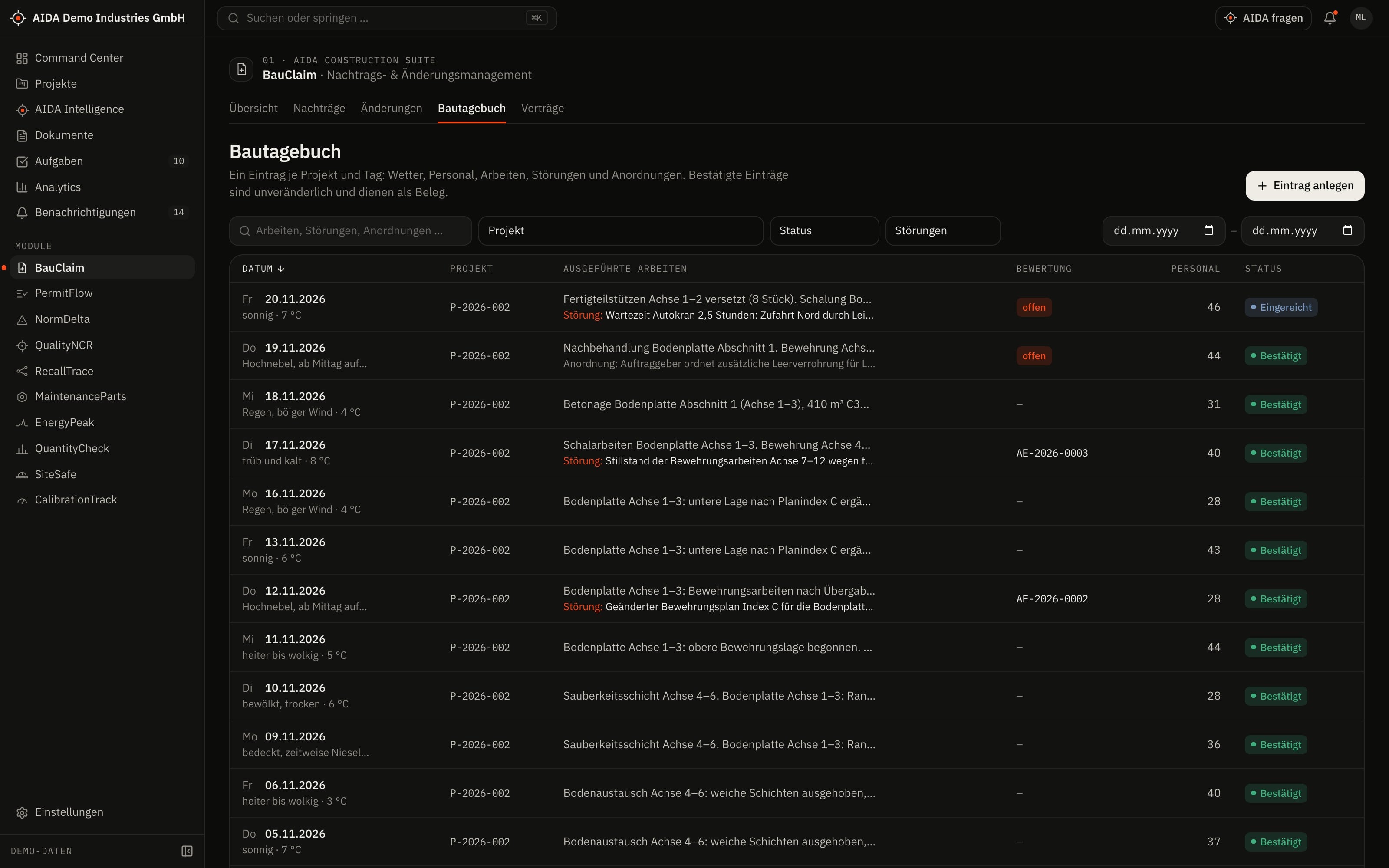
- Record, submit and confirm daily entries
- Entries serve as evidence for changes and claims
Changes
- Change events from “identified” via “notified” and “under review” to “accepted” or “not accepted”
- Document the notice with its date; the state of the deadline is shown on every change
- Compare drawing revisions: line-by-line comparison of the extracted text of two documents or versions
Claims
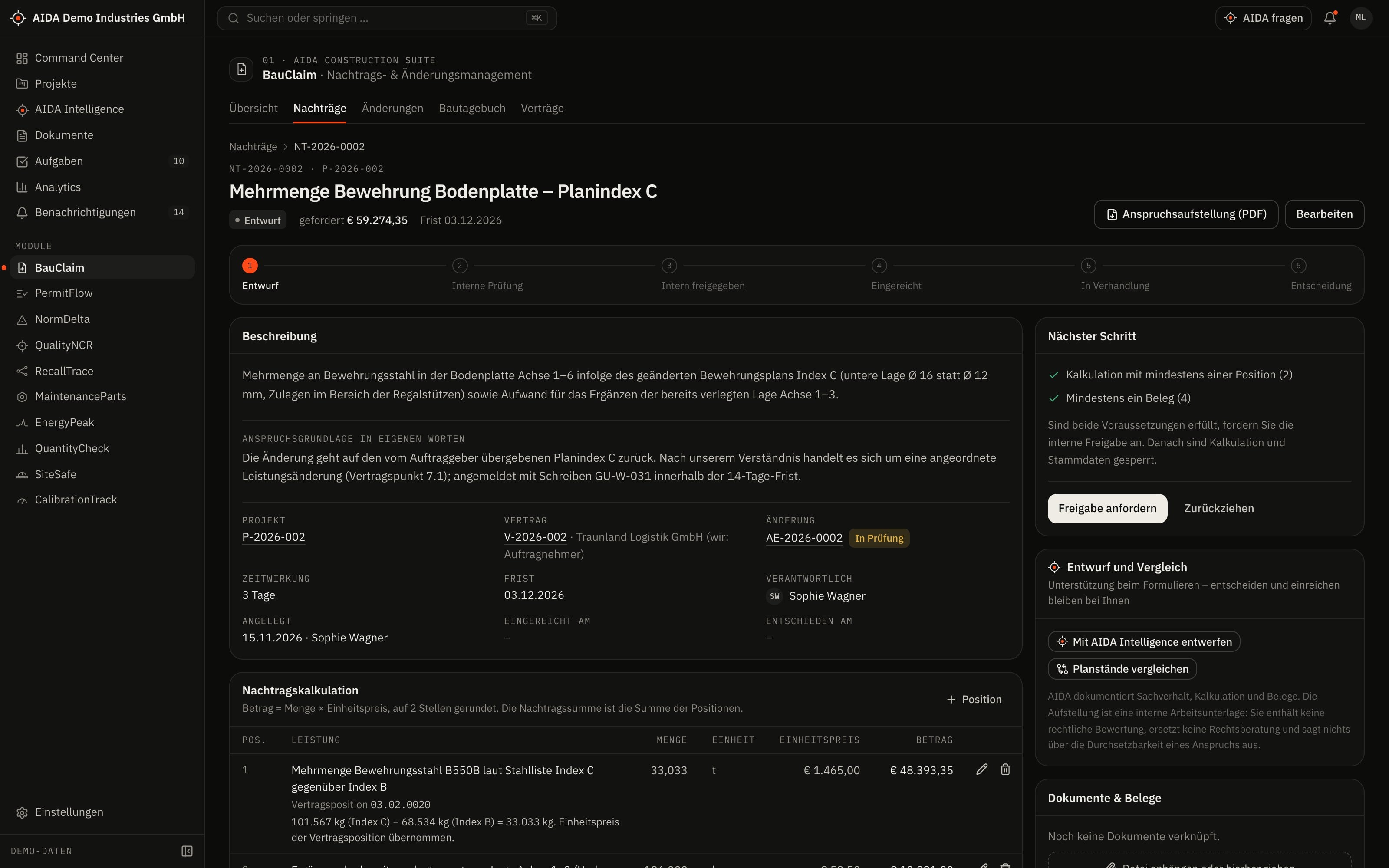
- Claim calculation from items with quantity, unit price and total
- Attach evidence: site diary, documents, photos, correspondence, drawing revisions, contract clauses
- Internal approval before submission; then negotiation and outcome – accepted, partially accepted or rejected
03
How AIDA
Helps
Two kinds of support that AIDA never mixes: fixed rules over your data – and an assistant that only writes after approval.
Rule-based · no language model
AIDA insights
Insights come from fixed calculation rules over stored data. Each names its evidence and links to the record.
- Possible change events: fixed keyword rules scan site diary entries for signs of ground conditions, drawing changes, instructions, authority requirements, disruption and quantity changes, and propose a change. You accept or dismiss the proposal.
- Notice deadline: computed from the event date and the period in the contract. AIDA points it out from 14 days before expiry, urgently from 3 days.
- Approval check: internal approval can only be requested once the claim has at least one item and one piece of evidence.
Assistant · only after approval
AIDA Intelligence
- From a claim you open AIDA Intelligence with that record as context – for a draft of a factual justification from facts, calculation and evidence. Anything not evidenced is flagged; there is no legal assessment.
- Answers cite their sources.
- Write actions are only carried out after you confirm.
- No AI service is configured by default. Without a service that is configured and approved by your organisation, the assistant works in research mode: sourced findings, no written text.
04
The
Workflow
From disruption to submitted claim
Keep the site diary
The day is recorded and submitted. The entry is confirmed by a person with the “approve” right.
Identify the change
AIDA flags entries by rule as a possible change event. You adopt the proposal or create the change yourself.
Give notice in time
The deadline follows from the contract. You document the notice with its date.
Calculate and evidence the claim
Enter items, attach evidence from the site diary and the document store.
Approve internally
Approval is decided by a person with the “approve” right – for example the finance reviewer.
Submit and record the outcome
The claim moves to “submitted”; negotiation and outcome are documented on the record.
Reports and exports
- Claim statement as PDF
- Claim list as CSV
Exports stay within the access limits of the person exporting; every export is in the audit log.
05
Clear
Limits
What BauClaim does not do – so you know what you can rely on.
- No legal advice
- BauClaim organises evidence and computes deadlines and totals. Whether a claim exists and can be enforced is for you and your legal advisers to assess – AIDA gives no guarantee of that.
- Proposals are pointers
- The rules recognise keywords, not facts. They do not replace reading the site diary.
06
Links
& Roles
Which modules BauClaim shares data with – and which roles read, write, approve or delete in it.
Works together with
- PermitFlow
- shared project
- QuantityCheck
- contract & bill of quantities
- AIDA Core
- projects, sites, documents, tasks and approvals
Roles and permissions
| Role template | Read | Write | Approve | Delete |
|---|---|---|---|---|
| Organization Owner | yes | yes | yes | yes |
| Organization Admin | yes | yes | yes | yes |
| Project Manager | yes | yes | yes | no |
| Engineer | yes | yes | no | no |
| Finance Reviewer | yes | no | yes | no |
| Read-Only Auditor | yes | no | no | no |
Templates as created when an organisation is set up. Every organisation can adapt them and create its own roles; checks happen on the server.
See AIDAat Work
With your access we set up BauClaim for you – together with the modules that go with it.