03ModulesTechnical Standards Intelligence
What changes – and what it means for you.
Standards register, changes and actions linked to projects. Licence-compliant: metadata and your own requirements, no copied standard texts.
03 — AIDA Compliance Suite
02
What
It Does
What NormDelta does in the application – ordered by area.
Standards register
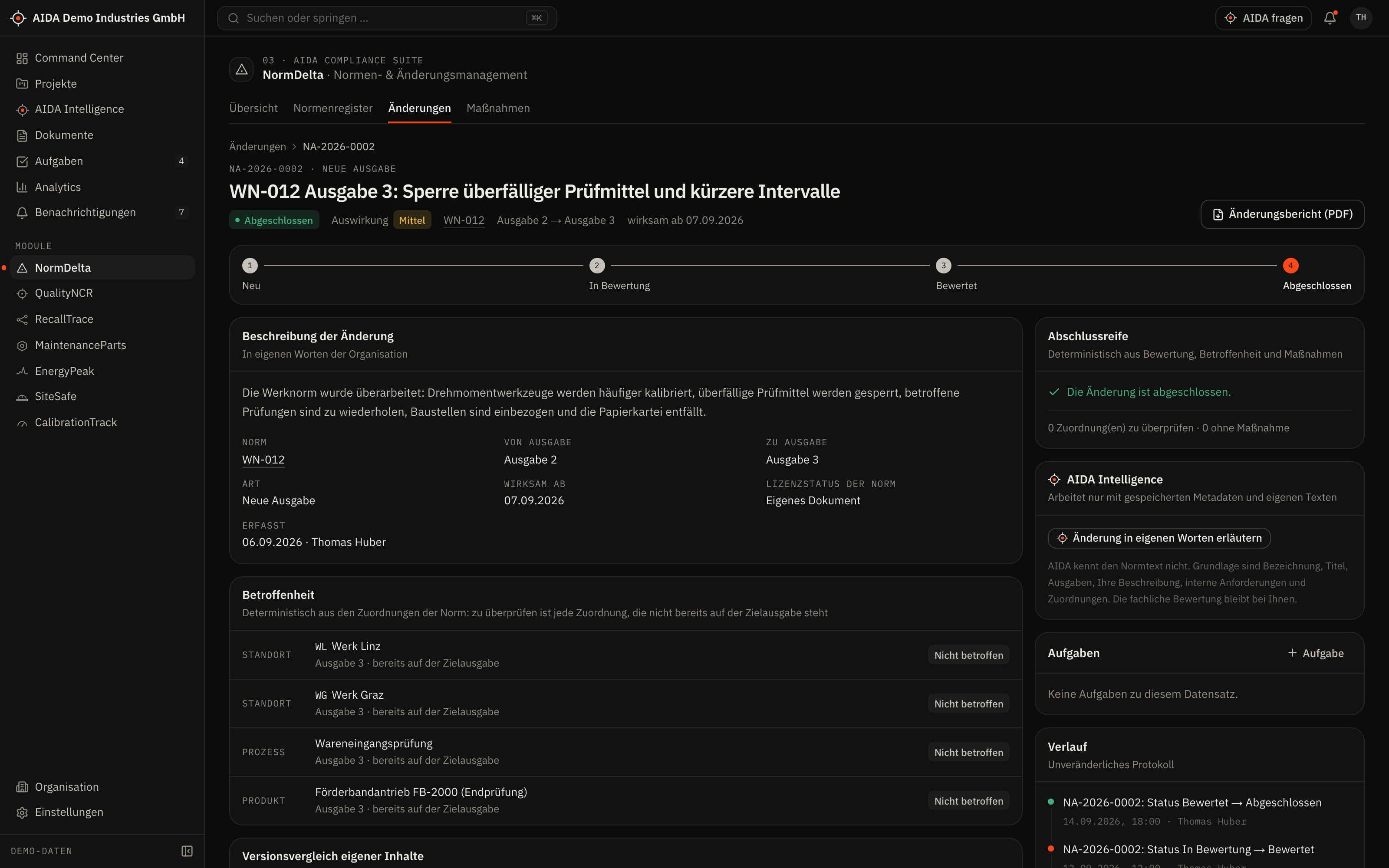
- Bibliographic data per standard: issuer, designation, title and editions
- Licence status per standard: metadata only, licensed or internal document
- Full texts can only be stored for licensed standards and for your own documents
Own requirements and assignment
- Record and approve requirements in your own words per edition
- Assign standards to projects, sites, processes and products
- Compare the requirements of two editions: new, removed, changed, unchanged
Changes
- Record a change: new edition, amendment, corrigendum, withdrawal or internal requirement
- Document the assessment and rate the impact on three levels
- Status from “new” via “in assessment” and “assessed” to “closed”
Actions
- Create actions for all affected assignments in one step – without duplicates
- Actions with an owner, a due date, a status and evidence
- Action register across all changes to standards
03
How AIDA
Helps
Two kinds of support that AIDA never mixes: fixed rules over your data – and an assistant that only writes after approval.
Rule-based · no language model
AIDA insights
Insights come from fixed calculation rules over stored data. Each names its evidence and links to the record.
- Impact: every assignment of the standard that does not already point to the new edition needs review. In the case of a withdrawal, all assignments are affected. This follows from the assignments, not from an estimate.
- Open assignments: AIDA shows which affected assignments do not yet have an action.
- Closure check: a change can only be closed once the assessment is documented, no action is still open and every affected assignment has been dealt with.
- An open action is overdue when its due date is before today.
Assistant · only after approval
AIDA Intelligence
- From a change to a standard you open AIDA Intelligence with that record as context.
- Answers cite their sources.
- Write actions are only carried out after you confirm.
- No AI service is configured by default. Without a service that is configured and approved by your organisation, the assistant works in research mode: sourced findings, no written text.
04
The
Workflow
From change to completed action
Record the change
New edition, type of change and effective date – in your own words, with the source.
Assess
What changes for us? The assessment and the impact level are documented.
See what is affected
AIDA lists the projects, sites, processes and products the standard is assigned to.
Create the actions
One action per affected assignment, with an owner and a due date.
Evidence and close
Completed actions get their evidence; after that the change can be closed.
Reports and exports
- Change report as PDF
- Action register as CSV
Exports stay within the access limits of the person exporting; every export is in the audit log.
05
Clear
Limits
What NormDelta does not do – so you know what you can rely on.
- Licence-compliant
- NormDelta stores bibliographic data and your own requirements – no copied standard texts. Full texts are kept only where you hold the licence.
- Changes are recorded, not monitored
- NormDelta does not watch issuers. The connection to a standards service (NormenKompass) is prepared but not connected – standards and changes are maintained by hand.
06
Links
& Roles
Which modules NormDelta shares data with – and which roles read, write, approve or delete in it.
Works together with
- PermitFlow
- project assignment
- QualityNCR
- process requirements
- SiteSafe
- site assignment
- AIDA Core
- projects, sites, documents, tasks and approvals
Roles and permissions
| Role template | Read | Write | Approve | Delete |
|---|---|---|---|---|
| Organization Owner | yes | yes | yes | yes |
| Organization Admin | yes | yes | yes | yes |
| Project Manager | yes | yes | no | no |
| Engineer | yes | no | no | no |
| Quality Manager | yes | yes | yes | yes |
| Safety Manager | yes | no | no | no |
| Maintenance Manager | yes | no | no | no |
| Read-Only Auditor | yes | no | no | no |
Templates as created when an organisation is set up. Every organisation can adapt them and create its own roles; checks happen on the server.
See AIDAat Work
With your access we set up NormDelta for you – together with the modules that go with it.